Create a new task
Step-by-step guide to creating a new task in SigmaDSA — title, description, due date, priority, category, and optional link to a lead or file.
Most tasks in SigmaDSA are generated automatically. But when you need to remember to follow up with a customer, chase a banker, or note a manual to-do, the New Task modal lets you create one in seconds.
How to create a task
Open the My Tasks board
From the left sidebar, click My Tasks. The board shows your status counters, tab strip, and existing tasks.
Click New Task
At the top-right of the board, click the New Task button. The Create Task modal opens.
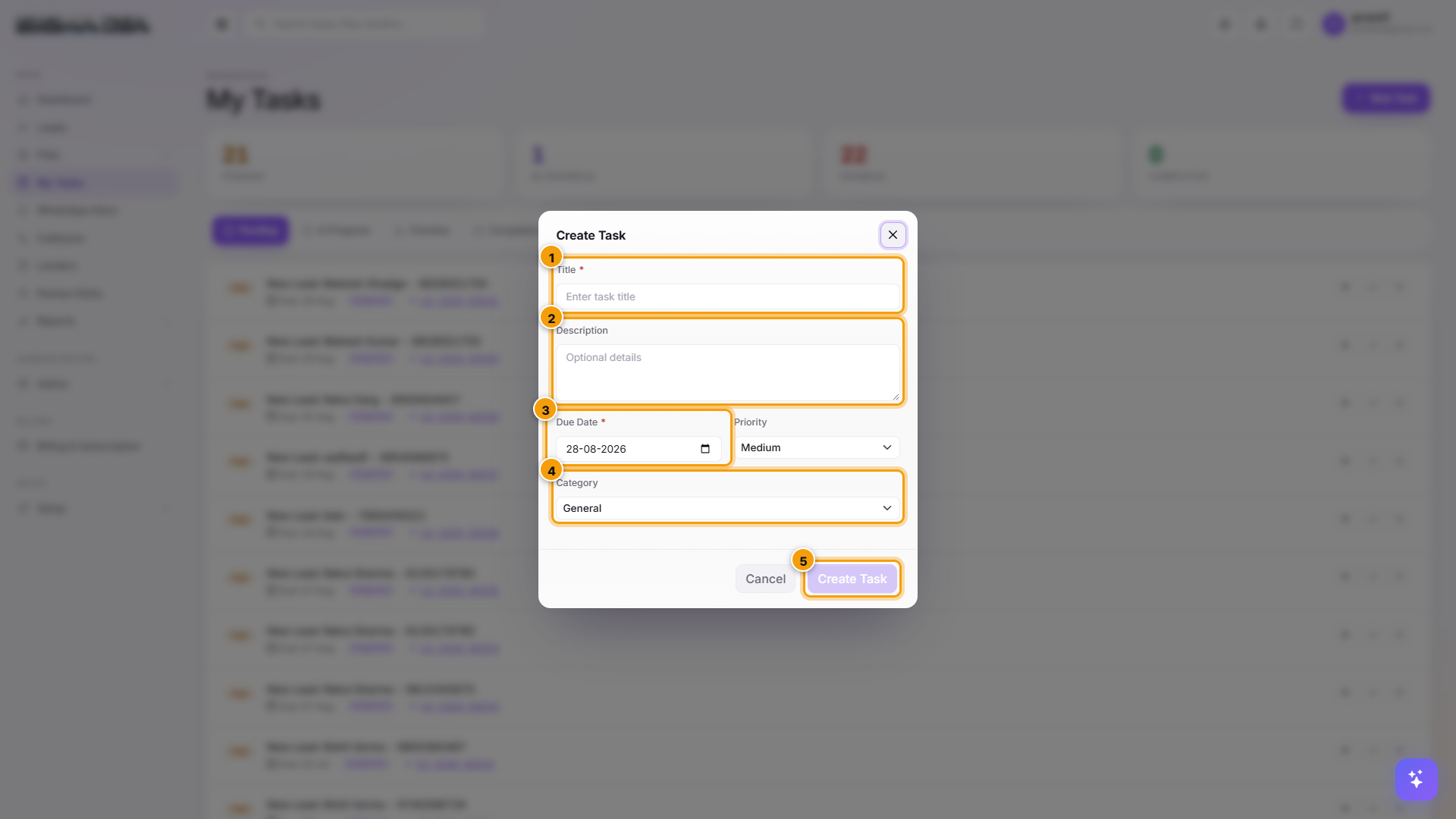
Fill the fields
| # | Field | What to enter |
|---|---|---|
| 1 | Title | Short description of what needs to be done. Required. |
| 2 | Description | Free-text details. Optional but useful when handing off to someone else. |
| 3 | Due Date | When the task should be done by. Defaults to today. Priority — Low / Medium / High / Urgent. Drives sort order within the board. |
| 4 | Category | Assignment / Callback / Document Chase / Query Response / Custom. Most user-created tasks use Custom. |
Click Save Task
The task lands on the Pending tab immediately. If you assigned it to someone else, the new owner gets an in-app notification (plus email if alerts are enabled).
Tips
- Reusable templates — when you create the same kind of task repeatedly (e.g., monthly bank reconciliation), save the form fields and re-use them.
- Link to a record — opening a lead or file and creating a task from there auto-links it; the task row on My Tasks shows the linked record ID with a click-through.
- Reassign before saving — set the assignee directly in the modal if the task is for someone else, avoiding a follow-up reassign step.
Next steps
My Tasks
The My Tasks board in SigmaDSA — auto-generated tasks for new lead assignments, callbacks, document chases, and bank follow-ups. Each task has a status, due date, priority, and one-click "Done".
Callbacks
The Callbacks board in SigmaDSA — scheduled customer call-backs, filtered by status (Pending, Overdue, Rescheduled, Completed) and loan type. Mark Complete, Reschedule, or Mark Missed inline.