Partner DSAs
Partner DSAs (connectors) in SigmaDSA — the sub-channel partners who source leads and files for your DSA. Capture contact info, KYC, bank details, default commission split, and track per-partner performance.
The Partner DSAs page is your sub-channel partner ledger — every connector who sources leads/files for your operation, with their contact info, KYC, bank account for payouts, and the default commission split that flows into disbursal calculations.
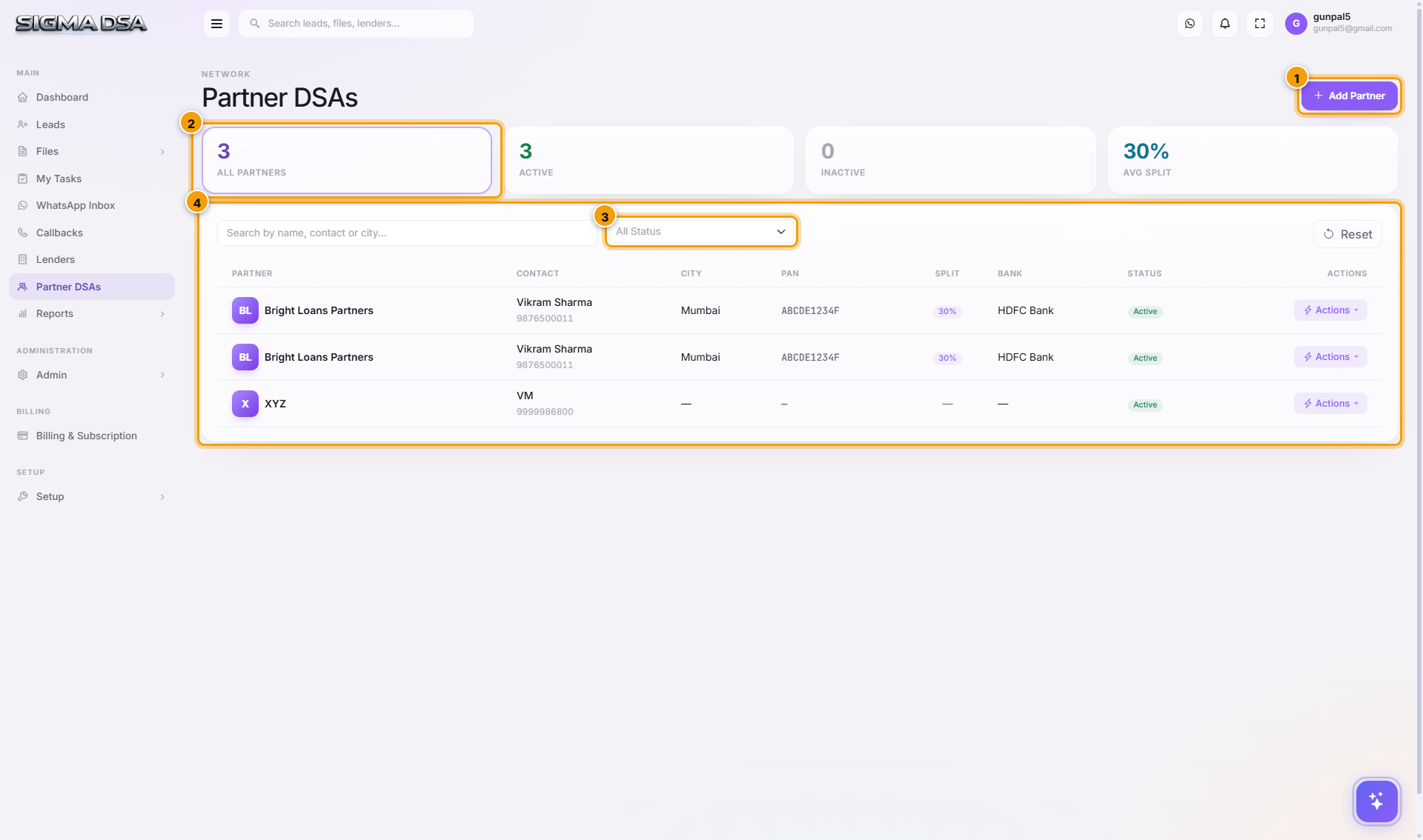
What's on the page
- Add Partner button — opens the modal to register a new sub-channel partner.
- Status filter — All / Active / Inactive.
- Partner table — one row per partner with the columns below.
Table columns
| Column | What it shows |
|---|---|
| Name | Partner's business / firm name. |
| Contact Person | Primary contact at the partner. |
| Mobile | Click-to-call. |
| City | Partner's city. |
| PAN | KYC identifier. |
| Default Split % | Default commission share — applied when this partner is tagged on a file's disbursal. Overridable per file. |
| Bank | The partner's bank for payout. |
| Status | Active / Inactive. |
| Actions | Edit, Delete, View Files, View Payouts. |
Adding a partner
Click Add Partner to open the modal. You'll capture:
- Name — partner business / firm name.
- Contact Person + Mobile + Email — primary contact.
- City + State.
- PAN + GSTIN (if applicable) — KYC.
- Default Commission Split % — typical share (e.g., 50%).
- Bank Details — account number, IFSC, account name — used by the Payouts module.
- Notes — free-text (tie-up date, special terms, etc.).
How partners flow through the system
| Stage | What happens |
|---|---|
| Lead created with partner tagged (via Lead Source or manual) | The lead's Partner DSA field is set. |
| File converted from that lead | Partner inherits to the file. |
| Disbursal recorded | Partner Payout = (Disbursed Amount × Commission %) × Default Split %. Stored on the disbursal row. |
| Payouts module | Aggregates pending + paid payouts per partner; you mark paid when the wire goes out. |
Common flows
- Onboard a new connector → Add Partner → fill KYC + bank + split → save. They'll be available in the Partner dropdown on the Lead Quick Add and File detail.
- Renegotiate split → Edit partner → change Default Split % → save. Future files use the new rate; past files keep their captured split.
- Off-board → Deactivate. Past files stay; new files won't be tagged.
- Per-file override → On the Disbursal modal's Partner DSA Payout section, override the split for one-off arrangements (e.g., a strategic partner getting 70% on a marquee deal).
Reports
The Reports module includes:
- Partner Performance — leads sourced, files converted, disbursed amount, total payout earned per partner.
- Payout Aging — pending payouts older than 30 / 60 / 90 days.
- Top Partners — sortable by volume / disbursed / payout.
Next steps
Add a lender
Step-by-step guide to adding a new lender (bank, NBFC, HFC, fintech) to your SigmaDSA panel — basic identity, partnership details, RM contact, and branch.
Add a partner DSA
Step-by-step guide to onboarding a new sub-channel partner (connector) in SigmaDSA — identity, contact, default split, address, KYC, and bank account for payouts.