Lenders
Lender Management in SigmaDSA — the master list of banks, NBFCs, HFCs, and fintechs you submit files to. Configure products, commission slabs, RM contacts, and per-lender eligibility rules.
The Lender Management page is the master list of every bank, NBFC, HFC, and fintech you submit files to. Each lender entry holds the basic contact info, the products you can submit, the commission slabs that drive your payout calculations, and the RM directory used for routing files.
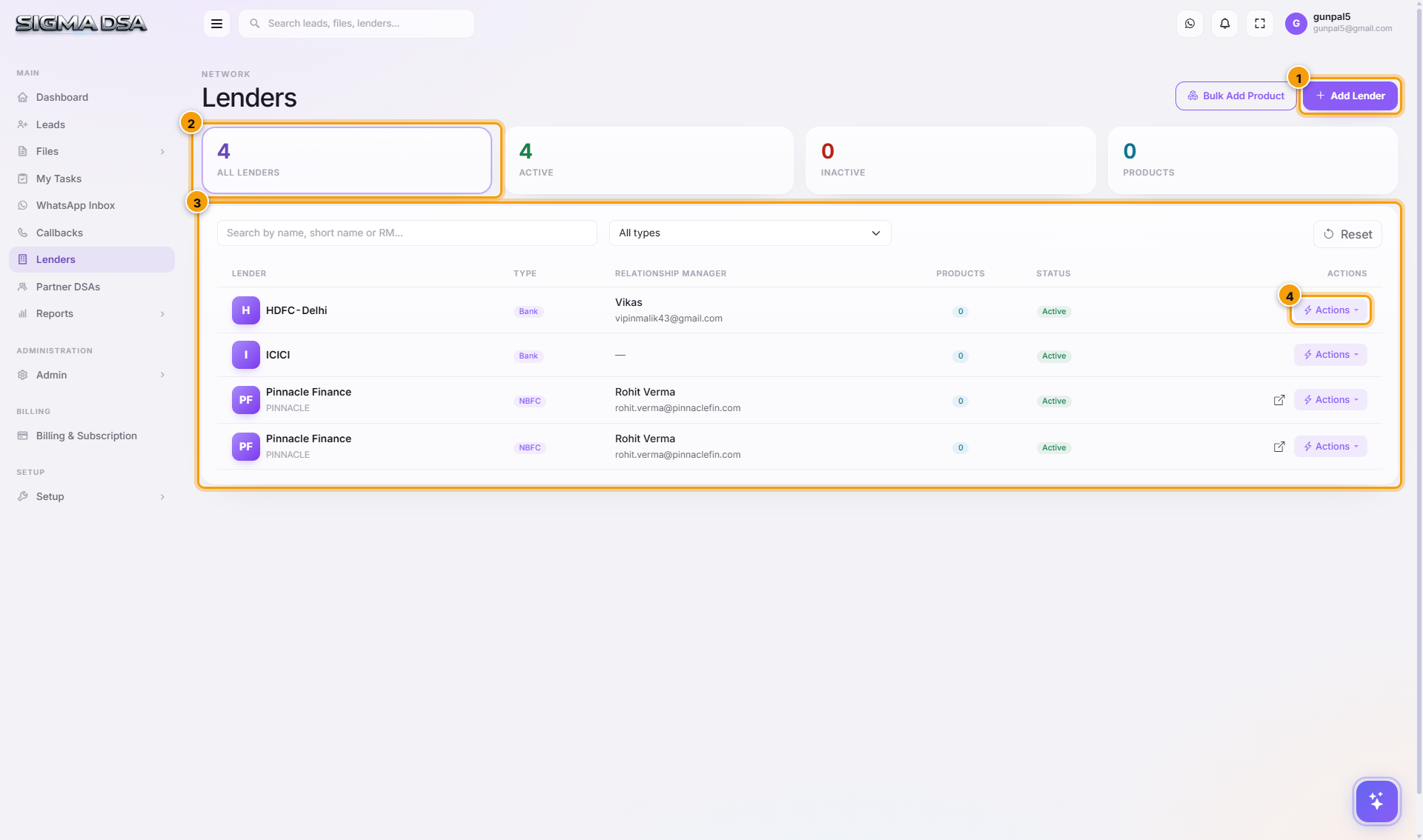
What's on the page
- Add Lender button — opens the modal to add a new lender to your panel.
- Lender table — one row per lender on your panel, with key fields.
- Per-row Actions — Edit, Manage Products, Deactivate, View Files.
Table columns
| Column | What it shows |
|---|---|
| Lender Name | Full official name (e.g., "HDFC Bank Limited"). |
| Short Name | Display name in dropdowns (e.g., "HDFC"). |
| Type | Bank / NBFC / HFC / Fintech / Other — drives category filters in Add Bank Login. |
| Contact Person | Default RM name for the lender (overridable per file). |
| Default RM email. | |
| Products | Count of configured products. Click to manage. |
| Status | Active / Inactive. |
| Actions | Edit, Manage Products, Activate/Deactivate. |
Adding a lender
Click Add Lender to open the modal. You'll capture:
- Lender Name — full official name.
- Short Name — what users see in dropdowns.
- Type — Bank, NBFC, HFC, Fintech.
- Default Contact Person + Phone + Email — the primary RM. Per-file overrides happen on the Bank Login row.
- Address — head office; used on lender correspondence templates.
- Active — start active unless you're staging it.
After save, the lender shows on the list and is available in Add Bank Login on file submissions.
Products: where commission lives
Each lender has one or more Products (configured under Actions → Manage Products on the lender row). A Product captures:
- Product Name — e.g., "HDFC Home Loan".
- Loan Type — Home Loan, Personal Loan, LAP, Business, etc.
- Commission Slabs — array of
{ minAmount, maxAmount, percentage }rows. Drives the auto-computed commission on the Disbursal modal. - Eligibility Rules — min CIBIL, max FOIR, employment type filters. Used by the lender-matching engine on the Credit Evaluation tab.
- Default ROI band + Processing Fee % — pre-fill on sanction modals.
How lenders connect to the rest of SigmaDSA
| Where used | What |
|---|---|
| Add Bank Login modal | Active lenders show in the search/dropdown. |
| Lender matching (Credit Evaluation) | Eligibility rules per product evaluated against the file. |
| Disbursal modal | Commission % auto-fills from the Product's slabs. |
| Payouts module | Aggregates expected commissions per lender per month. |
| Reports → Lender Performance | Conversion / pending / paid by lender. |
Common flows
- New tie-up signed → Add Lender → Manage Products → add each product with its commission slab → save. Lender is now bookable.
- Commission slab renegotiated → open the lender → Manage Products → edit the slab → save. Future disbursals use the new rate; past ones keep the rate from when they were created.
- Tie-up ended → open the lender → Deactivate. Historical files stay, the lender drops out of Add Bank Login.
Next steps
WhatsApp Inbox
The WhatsApp Inbox in SigmaDSA — read every conversation your AI Employee is having with customers, take over a chat when a human is needed, and start a new conversation with an approved template.
Add a lender
Step-by-step guide to adding a new lender (bank, NBFC, HFC, fintech) to your SigmaDSA panel — basic identity, partnership details, RM contact, and branch.