DNS & Domain
The DNS records you need to add at your domain registrar (GoDaddy, Cloudflare, Namecheap, etc.) to wire up your public website and custom email domain. Click Verify All once the records are live.
The DNS & Domain page (/settings/dns) lists every DNS record you need to add at your domain registrar to make the website and email work. The records auto-populate after you configure Email Domain and add your domain on Website. You paste them at your registrar, wait for propagation, then click Verify All.
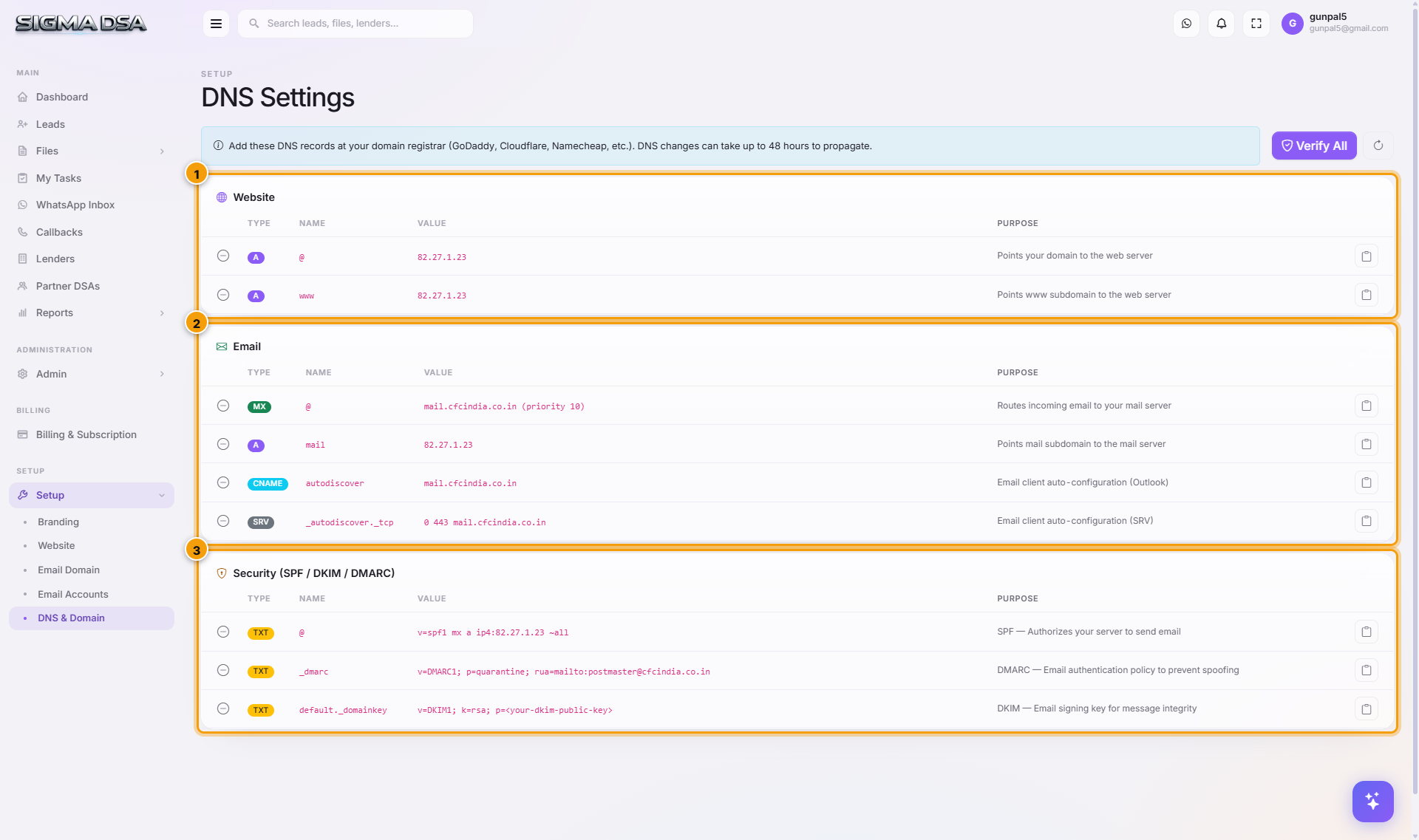
The records — what each one does
Website (2 records)
| Type | Name | Value | Purpose |
|---|---|---|---|
| A | @ | 82.27.1.23 | Apex domain points at the SigmaDSA web server. |
| A | www | 82.27.1.23 | www subdomain → same server. Both yourdsa.com and www.yourdsa.com resolve. |
Email (4 records)
| Type | Name | Value | Purpose |
|---|---|---|---|
| MX | @ | mail.yourdsa.com (priority 10) | Routes incoming *@yourdsa.com mail to your SigmaDSA mail server. |
| A | mail | 82.27.1.23 | mail.yourdsa.com subdomain → mail server IP. |
| CNAME | autodiscover | mail.yourdsa.com | Outlook auto-configuration. |
| SRV | _autodiscover._tcp | 0 443 mail.yourdsa.com | Fallback auto-config for clients that don't use CNAME. |
Security (3 records — SPF / DKIM / DMARC)
| Type | Name | Value | Purpose |
|---|---|---|---|
| TXT | @ | v=spf1 mx a ip4:82.27.1.23 ~all | SPF — authorises the mail server to send for your domain. |
| TXT | _dmarc | v=DMARC1; p=quarantine; rua=mailto:postmaster@yourdsa.com | DMARC — anti-spoofing policy + aggregate report destination. |
| TXT | default._domainkey | v=DKIM1; k=rsa; p=<long key> | DKIM — signing key for outgoing email integrity. |
How to add the records at your registrar
The exact UI varies by registrar but the concepts are universal.
GoDaddy
DNS Management → Records section → Add. Each row maps:
- Type → Type (A, MX, CNAME, SRV, TXT).
- Host → Name (
@,www,mail, etc.). - Points to / Value → Value.
- TTL → 1 Hour (default).
Cloudflare
DNS → Records → Add record. Important: for MX / mail. A / autodiscover CNAME, click the Proxy status column and set to DNS only (grey cloud). The website A records can stay proxied (orange cloud) for CDN.
Namecheap
Advanced DNS → Add New Record. Same field mapping as GoDaddy.
Google Domains / Cloudflare Registrar
Similar flow — find the DNS panel, add records one by one matching Type / Name / Value.
Verify
Once records are added (and you've waited at least 5–10 minutes for propagation):
Click Verify All
Top of the page. SigmaDSA does an authoritative DNS lookup for each record and compares against the expected value.
Status per record
Each row's status flips to Verified ✓ or Failed ✗. Failed rows show the actual returned value next to the expected one — pinpointing the difference.
Re-run after fixing failures
Common fixes: trailing dot issues, Cloudflare proxy, DKIM line breaks. Edit at the registrar → wait 5 min → re-Verify All.
What works after all records verified
| Capability | Requires |
|---|---|
| Public website live at your domain | Website A records verified + Publish toggled on (under Website page) |
Send/receive email at *@yourdsa.com | MX + mail-A records verified |
| Outlook auto-configures with email + password | CNAME autodiscover + SRV records verified |
| Outgoing email lands in customer inbox (not spam) | SPF + DKIM + DMARC records all verified |
| Customer mailbox shows the "verified domain" indicator | DMARC p=quarantine or p=reject policy |
Common issues
- MX value got domain appended — registrar requires either bare hostname OR fully-qualified with a trailing dot. Set to
mail.yourdsa.com.(with trailing dot) at Cloudflare and Namecheap;mail.yourdsa.com(no dot) at GoDaddy and Google Domains. - DKIM TXT too long error — split into 255-char chunks at most registrars; Cloudflare allows up to 2048 chars in one value. If split, surround each chunk with quotes:
"first-chunk" "second-chunk". - SPF
~allvs-all—~all(soft fail) is the default — failing-SPF mail still arrives but gets flagged. After deliverability is stable, switch to-all(hard fail) to fully reject spoofed mail. - DMARC
p=nonefor first month — if you're worried about over-quarantining your own legitimate mail, start withv=DMARC1; p=none; rua=...to monitor. Switch top=quarantineonce aggregate reports show no false positives.
Permission gating
Admin role. The Verify All action is non-destructive — no permissions needed for end users.
Next steps
Email Accounts
Create per-user mailboxes on your custom email domain (`user@yourdsa.com`). Includes IMAP/SMTP server details for connecting Outlook, Gmail, and Apple Mail.
Billing & Subscription
Manage your SigmaDSA subscription — see the current plan and what it includes, download past invoices, and cancel or change the plan.