Document Types
Configure the file checklist in SigmaDSA — PAN, Aadhaar, Bank Statement, ITR, Salary Slip, etc. Mark which types need a date range (last N months) and which need AI analysis (Bank Statement Analyzer, OCR).
The Document Types page (/settings/document-types) is the master catalogue of every kind of document the system understands. Each type controls what fields the upload UI asks for, whether AI analysis runs, and how the document surfaces on the file checklist.
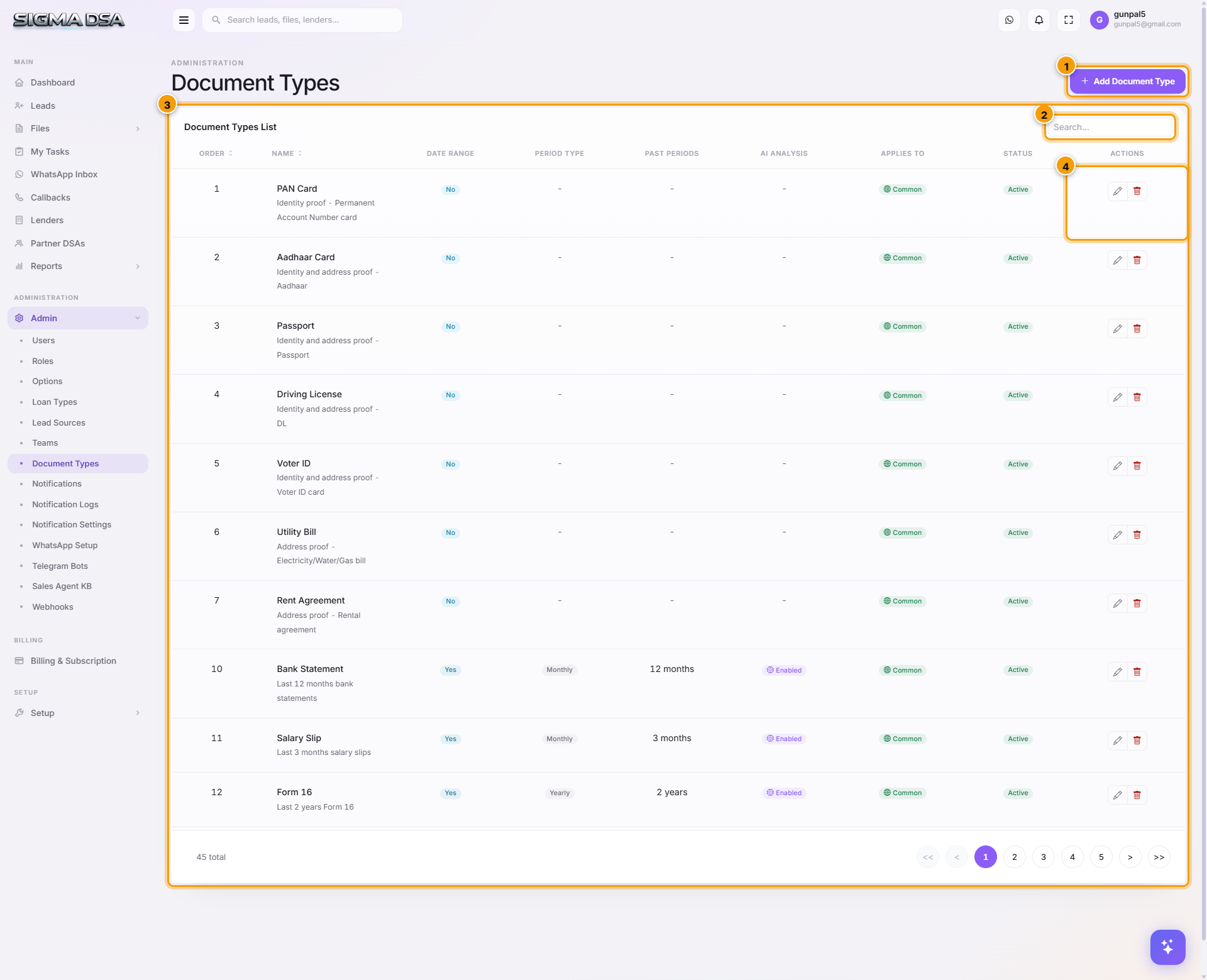
Add a document type
Click Add Document Type
Top-right. A centred modal opens.
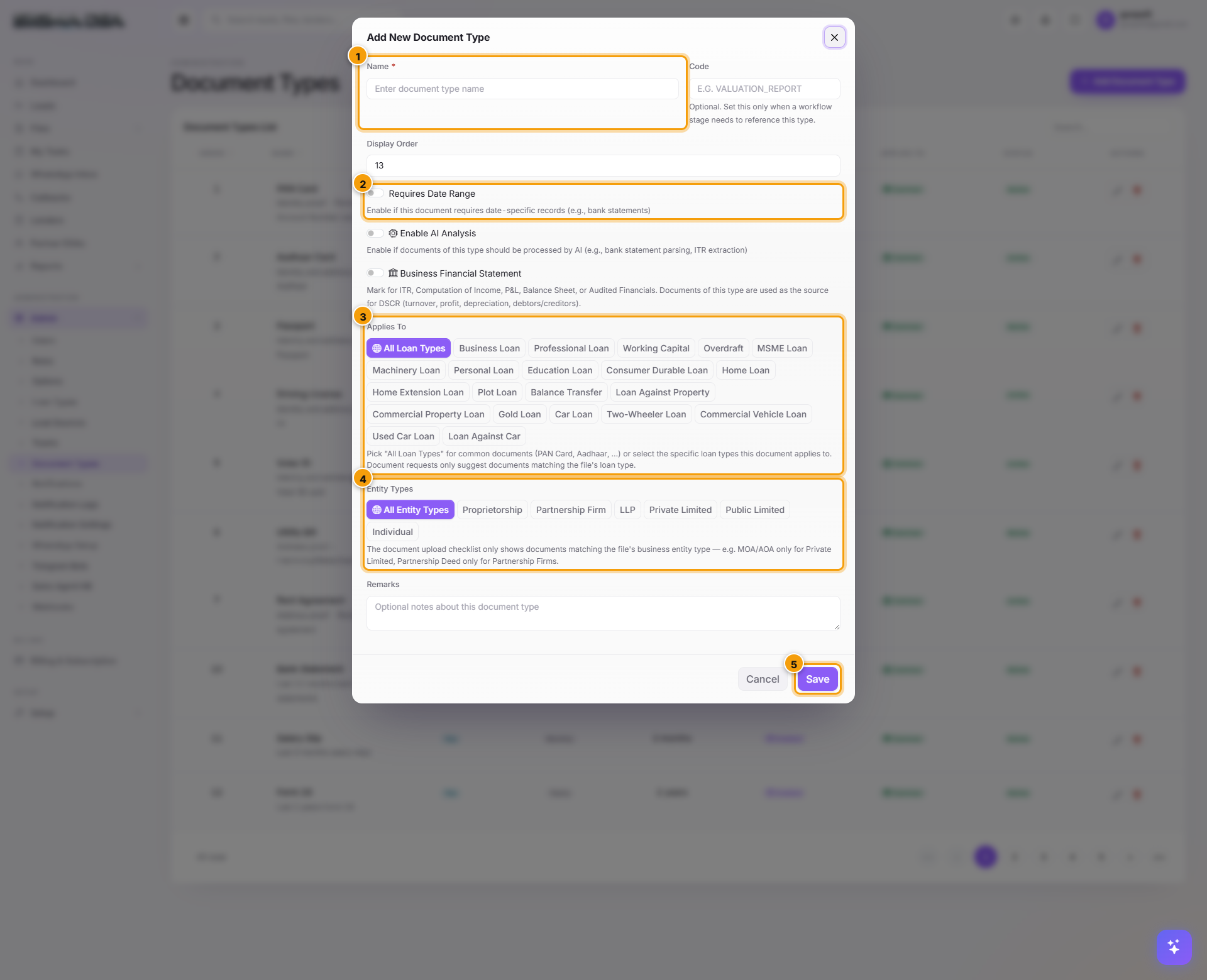
Identity
- Name — display name (e.g., "Bank Statement"). Required. Shown on the file checklist.
- Code — short identifier (e.g.,
BS,PAN,AADHAAR). Required. Used by API + lender integrations. - Display Order — lower = appears first on the checklist.
Date Range
If the document represents a time period (last N months, last N years), check Requires Date Range. Two more fields appear:
- Period Type — Monthly / Yearly / Quarterly.
- Past Periods — how many periods (e.g., 12 for "last 12 months").
The upload UI then prompts the user to confirm the period covered, and the AI pipeline uses this window for its analysis.
AI Analysis
Check Enable AI Analysis to route uploads through SigmaDSA's AI pipeline. The pipeline that runs depends on the document name pattern:
| Document type | AI pipeline triggered |
|---|---|
| Bank Statement (or similar) | AI Bank Statement Analyzer — parses every transaction, detects salary credits, EMIs, bounces, computes monthly inflow/outflow. Output lands on the Credit Evaluation tab. |
| PAN Card / Aadhaar Card / Driving License | OCR field extraction — pulls PAN number, Aadhaar number, name, DOB, address. Auto-fills the applicant card on File Details. |
| Salary Slip / Form 16 / ITR | OCR + numeric extraction — pulls employer, gross/net amounts, period. Feeds income analysis. |
| GSTR-1 / GSTR-3B | Tax-return parser — pulls turnover, tax paid, filing date. Feeds GST section on Credit Evaluation. |
| Other | Stored as-is, no analysis. |
Remarks
Free-text note for ops. E.g., "Required for all Home Loan files" or "Only needed if applicant is self-employed."
Click Save
The new document type appears in the loan-file Documents tab checklist immediately (for files of relevant loan types). Configure which types are mandatory for which loan products via per-loan-type configuration.
The default catalogue
SigmaDSA ships with 45+ document types covering the standard DSA document checklist:
Identity / KYC
PAN Card · Aadhaar Card · Passport · Driving License · Voter ID
Address proof
Utility Bill · Rent Agreement · Passport (also accepted)
Income — Salaried
Salary Slip (3 months, AI-enabled) · Form 16 (2 years, AI-enabled) · Bank Statement (12 months, AI-enabled)
Income — Self-Employed / Business
ITR (3 years, AI-enabled) · Computation of Income · Audited Financials · GSTR-1 (12 months, AI-enabled) · GSTR-3B (12 months, AI-enabled) · GST Registration Certificate · GST Annual Return (GSTR-9)
Banking
Bank Statement · OD/CC Statement · Sanction Letters from Existing Lenders
Property — Home Loan / LAP
Sale Agreement · Title Chain · Builder NOC · Society NOC · Property Tax Receipt · Encumbrance Certificate
Vehicle — Car Loan
RC of Trade-in Vehicle · Vehicle Invoice · Insurance Policy
Other
CIBIL Report PDF · Photo · Cheque (cancelled, for ECS) · Reference Letters
Edit / Deactivate
From the row's Actions:
- Edit — adjust any field including AI analysis toggle.
- Deactivate — hides from new uploads without affecting historical files.
- Delete — only if no documents reference the type.
Permission gating
LoanCRM.DocumentTypes.* permissions. Default granted to admin role only.
Next steps
Lead Sources
Configure the channels leads come into SigmaDSA from — Walk-in, Referral, Phone Call, Web Form, WhatsApp, partner names, etc. Drives the Source filter on the Leads board and the per-source ROI reports.
Notifications
Manage email, WhatsApp, and SMS notification templates in SigmaDSA — define when messages fire, who receives them, what the body says, and which variables are interpolated. WhatsApp templates sync to Meta for approval.