Bank Statement section
The Bank Statement section of the Credit Evaluation editor — AI Bank Statement Analyzer output covering inflows, outflows, salary detection, existing EMIs, bounces, average balance.
The Bank Statement section shows the output of SigmaDSA's AI Bank Statement Analyzer (BSA) — every transaction in the uploaded statement parsed, categorised, and rolled into the headline metrics lenders care about.
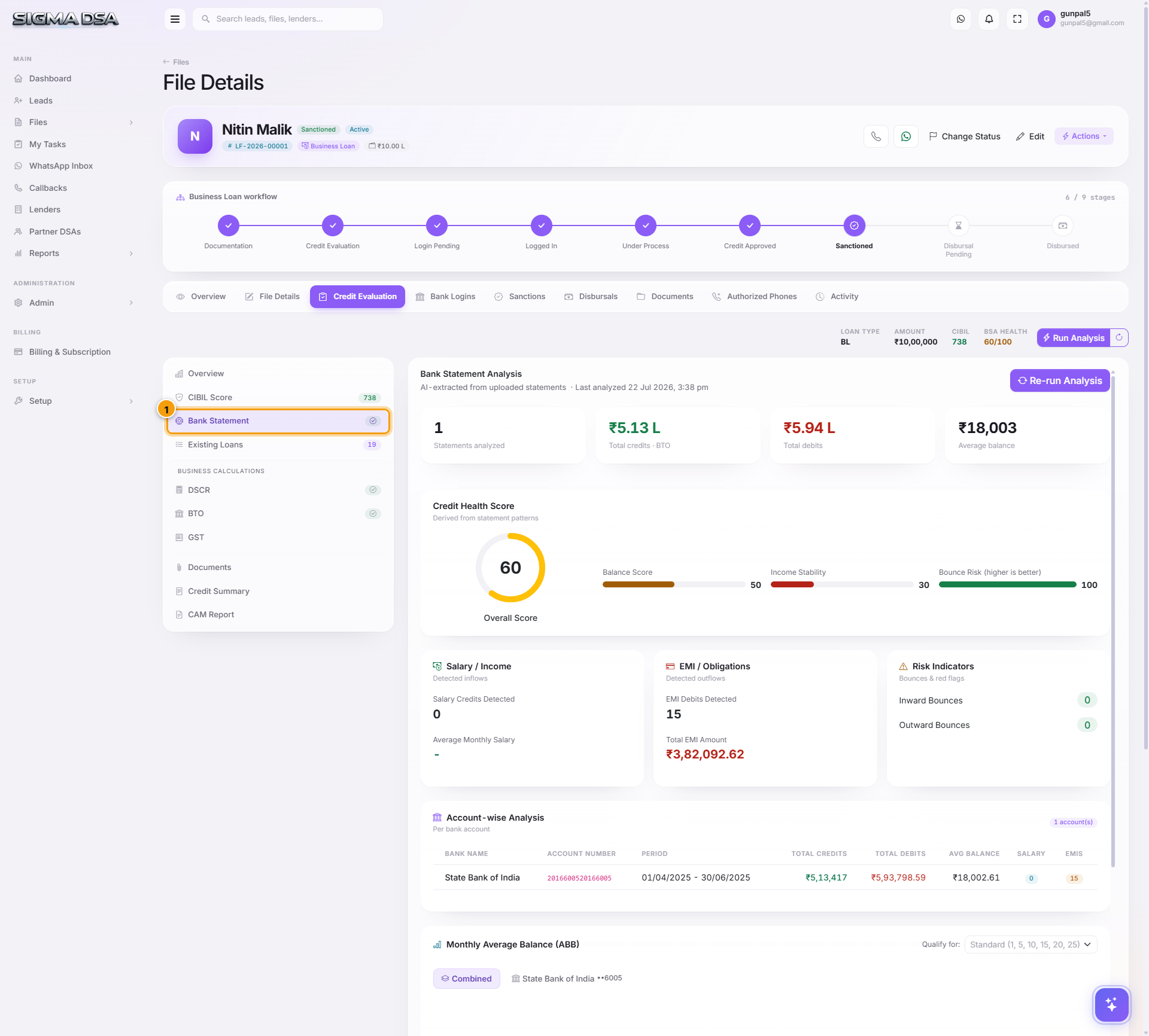
What's on the section
Headline metrics
- Statement Period — start + end date of the analyzed window (typically 6 or 12 months).
- Account Number / Bank Name — auto-extracted from the statement header.
- Average Monthly Inflow — total credits ÷ months.
- Average Monthly Outflow — total debits ÷ months.
- Average Closing Balance — useful for cash-flow loans where end-of-day balance matters.
- Maximum Balance / Minimum Balance — health indicators.
Transaction breakdown
- Salary Credits detected — date, amount, source bank, classifier.
- EMI Outflows detected — auto-matched to loan accounts (populates Existing Loans).
- UPI / Card / Cash outflows — categorised separately.
- Bounce events — cheque/ECS/NACH/auto-debit failures. Each one is a red flag for lenders.
AI insights
- Salary Stability Score — for salaried applicants, "how consistent is the salary credit" (1–10).
- Cash Flow Trend — improving / flat / declining trend over the period.
- Suspicious Activity Flags — round-tripping, unusual cash deposits, etc.
What banks look at from BSA
| Lender focus | What they check |
|---|---|
| Salaried loans | Salary stability score, salary credit date consistency, salary trend (rising/flat/falling). |
| Business loans | Inflow trend, average closing balance, ratio of business inflows to personal withdrawals, bounce count. |
| NBFCs / sub-prime | Bounce count above all else — even one bounce can kill the file at conservative NBFCs. |
| All lenders | Are existing EMIs detected consistent with what the applicant declared? Mismatches = misrepresentation flag. |
Common flows from this section
- Re-run BSA after uploading a fresh statement → upload to the Documents tab → return to this section → click Re-extract in the section header.
- Override a misclassified salary credit → click the transaction row → change category → save.
- Detected EMIs don't match Existing Loans → reconcile before submitting; bank will catch this on their bureau pull anyway.
- Bounces visible in the BSA output → discuss with applicant; many banks have a "max 1 bounce in last 6 months" rule.
Next steps
CIBIL Report section
The CIBIL Report section of the Credit Evaluation editor — fetching a bureau report per party, the report balance, score and scoring factors, summary, accounts with the DPD grid, and enquiries.
Existing Loans section
The Existing Loans section of the Credit Evaluation editor — every running EMI obligation the applicant has, with lender, type, outstanding, EMI, and months remaining. Feeds the FOIR / DSCR denominator.