Existing Loans section
The Existing Loans section of the Credit Evaluation editor — every running EMI obligation the applicant has, with lender, type, outstanding, EMI, and months remaining. Feeds the FOIR / DSCR denominator.
The Existing Loans section lists every loan/EMI the applicant is currently servicing. The total monthly EMI from this list feeds the FOIR denominator (for salaried) and the DSCR denominator (for business). Getting this section accurate is the single biggest factor in eligibility math.
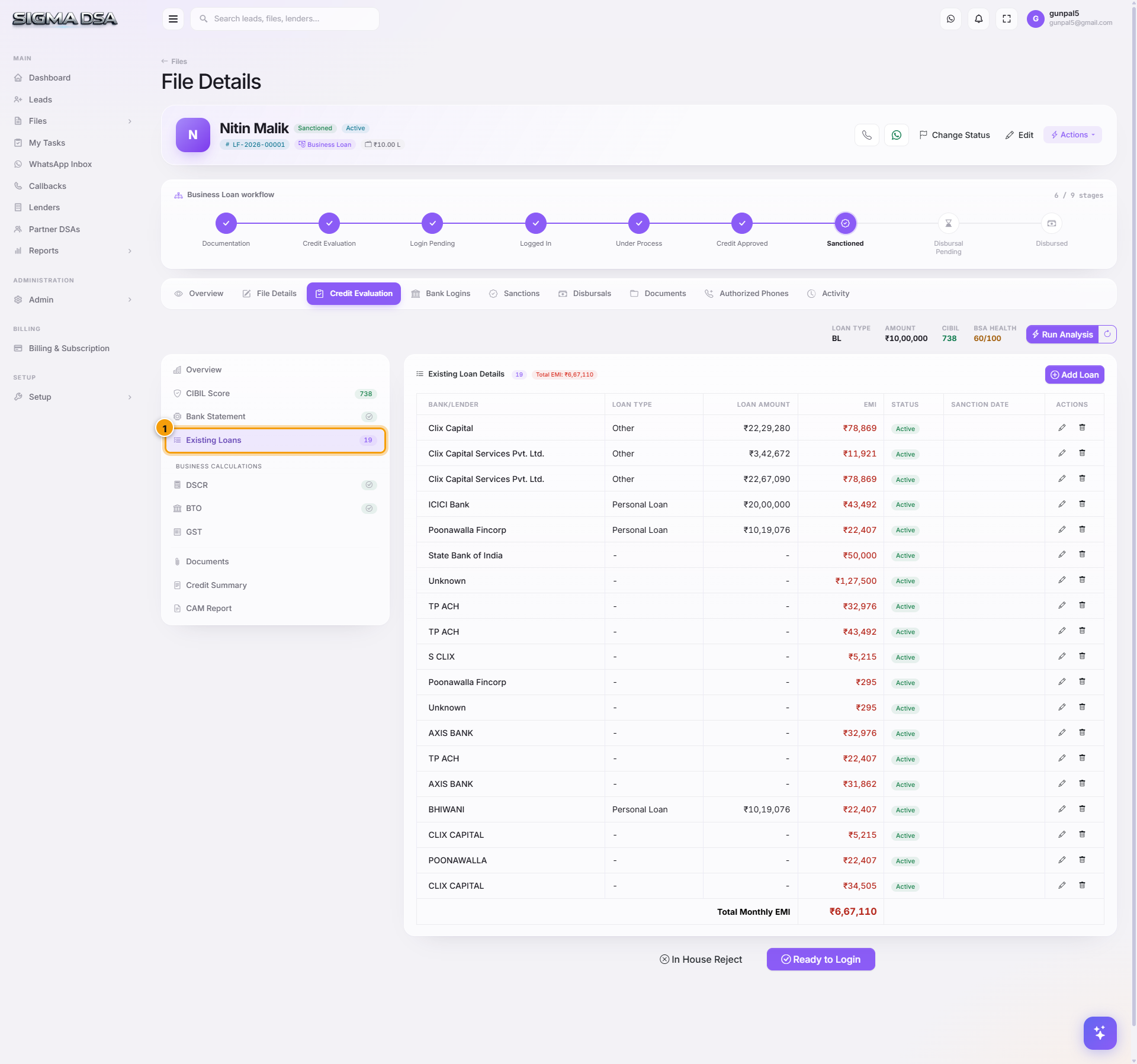
What's on the section
Each row captures one running obligation:
- Lender — who the loan is from.
- Loan Type — Home Loan, Personal Loan, Credit Card, Vehicle, Business, Gold, Other.
- Outstanding Amount — current principal balance.
- Original Sanctioned Amount — what was sanctioned originally.
- EMI — monthly installment.
- Tenure Remaining (months) — months left to close.
- Account Number / Last 4 digits — for identification (optional).
- Bureau Source (auto-flag) — pulled from CIBIL report.
- BSA Source (auto-flag) — detected in bank statement.
- Manual (auto-flag) — added by user (no bureau/BSA match).
The header counter (e.g., "Existing Loans 16") shows the total row count. Sum-of-EMIs displays at the bottom.
How rows are populated
| Source | When it appears |
|---|---|
| Bureau | Every open tradeline from the CIBIL pull lands here automatically when you save the CIBIL section. |
| BSA | Any monthly EMI pattern the Bank Statement Analyzer detected with reasonable confidence. |
| Manual | What the applicant told you that doesn't show up in bureau or BSA. |
Mandatory accuracy
Banks cross-check this list against their own bureau pull. A missing tradeline = misrepresentation flag = likely rejection. So:
- Never delete a bureau-sourced row even if the applicant claims it's closed. If it's actually closed, change status to Closed (and the system will compute remaining tenure as 0) — but the bureau record won't disappear until the report is refreshed.
- Reconcile bureau vs BSA — if bureau shows an open Home Loan but BSA doesn't show a corresponding EMI debit, either the EMI is being paid from another account (note it), or the loan moratorium is active.
- Add manual rows when the applicant disclosed a Gold Loan or family loan that hasn't hit bureau yet.
Common flows from this section
- Add a freshly-disclosed loan → click + Add Loan → fill lender + type + EMI + outstanding → save. FOIR/DSCR sections update immediately.
- Update outstanding after recent EMI payments → click the row → update outstanding → save.
- Mark a loan as closed → row dropdown → Mark Closed. The row stays for audit but EMI drops out of the FOIR sum.
- Reorder by EMI size → click the EMI column header to sort, useful when deciding which loan to ask the applicant to pre-close before submitting.
Next steps
Bank Statement section
The Bank Statement section of the Credit Evaluation editor — AI Bank Statement Analyzer output covering inflows, outflows, salary detection, existing EMIs, bounces, average balance.
DSCR section
The DSCR (Debt Service Coverage Ratio) section of the Credit Evaluation editor — turnover, profit after tax, cash accruals, total debt service. Used for self-employed and business loans.