CIBIL Report section
The CIBIL Report section of the Credit Evaluation editor — fetching a bureau report per party, the report balance, score and scoring factors, summary, accounts with the DPD grid, and enquiries.
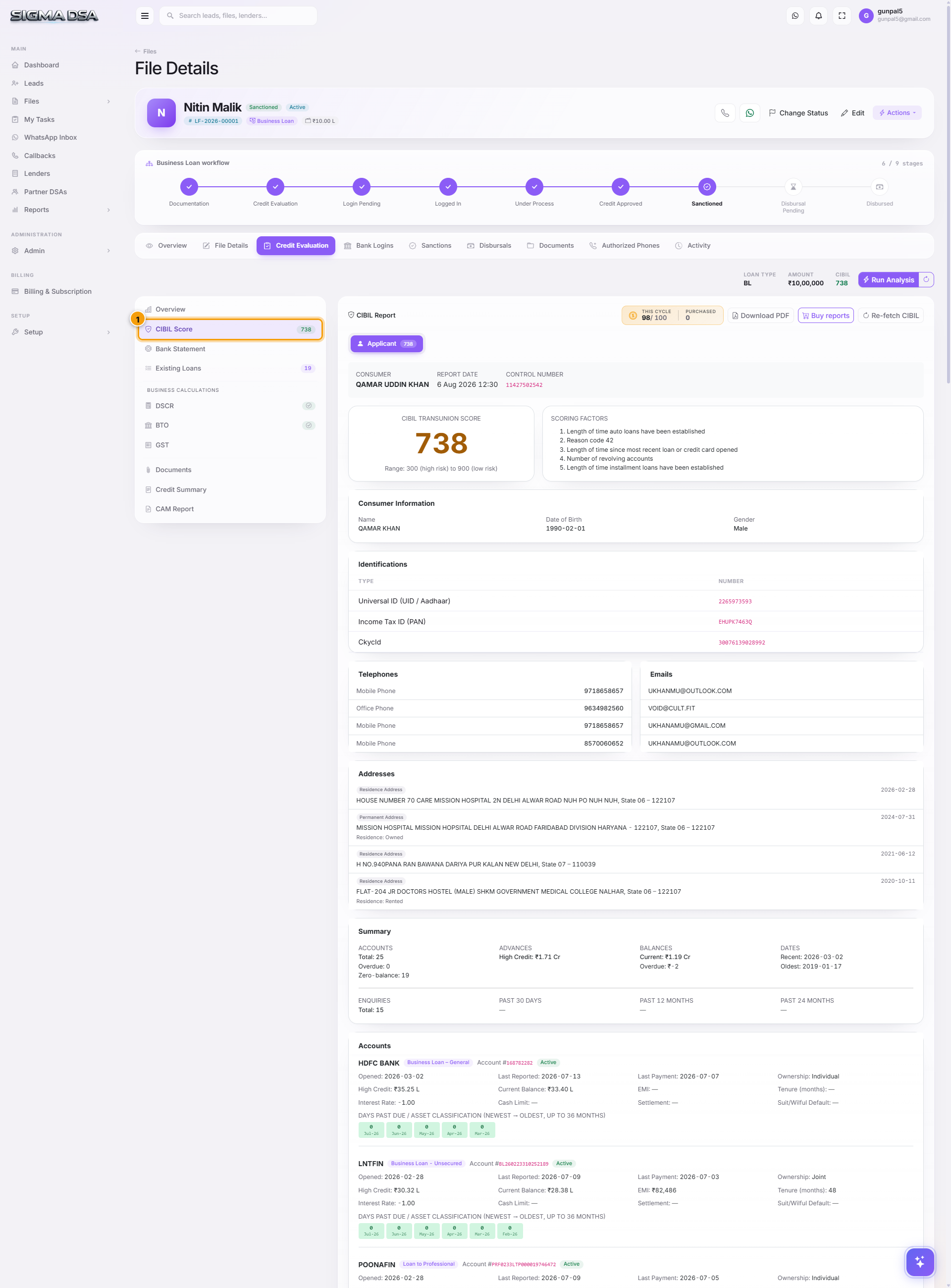
The CIBIL Report section of the Credit Evaluation editor pulls the applicant's TransUnion CIBIL report and renders it in full inside the loan file — score, payment history, live accounts and recent enquiries — so you can judge a file without opening a separate bureau portal.
Where it lives
Files → open a file → Credit Evaluation tab → CIBIL Report.
The section header
- Report balance chip — This cycle shows the reports remaining out of the number your plan includes per billing cycle; Purchased shows reports bought as top-up packs. Purchased reports never expire and are used after the plan allowance runs out.
- Download PDF — saves the report you are looking at as a SigmaDSA-branded PDF, ready to attach to a lender submission. Appears once a report exists.
- Buy reports — opens the top-up pack picker. Packs work on both prebuilt and custom plans; prices are exclusive of 18% GST.
- Fetch CIBIL — opens the fetch dialog. Once a report exists the button becomes Re-fetch CIBIL, which opens the same dialog with Force refresh already switched on.
- An Expired badge appears next to the title when the stored report is past its cache window.
Party tabs
Every party on the file with a PAN gets its own tab — applicant, co-applicant, guarantor — each showing the party's score as a badge: green at 750 and above, amber from 650 to 749, red below 650. A party with no report yet shows a dash, and one without a PAN shows no PAN; add the PAN on the file to enable the fetch. When a party has been pulled more than once, the fetch date is appended to the tab so you can compare pulls over time.
Fetching a report
The Fetch CIBIL dialog asks for:
- Party — shown when the file has more than one party. Selecting a party fills the fields below from the file.
- Full Name — as printed on the PAN card.
- PAN — ten characters,
AAAAA9999A. - Mobile — ten digits.
- Gender — male or female.
- Force refresh — skips the cache and pulls a brand-new report. This is what costs a credit.
Reports are cached by PAN and shared across files, so the same borrower appearing on a second file does not cost a second report. If your plan allowance and purchased packs are both exhausted, the dialog shows an Out of CIBIL reports banner with a Buy a pack button instead of failing silently.
The bureau connection itself is operated by SigmaDSA centrally — there is no API key for you to configure. What you control is how many reports your plan includes and how many packs you buy.
What the report shows
Once a report loads, the section renders it top to bottom:
- Header strip — consumer name, report date and time, the bureau's control number, and a Cached or Fresh fetch badge telling you whether this pull hit the API.
- CIBIL TransUnion Score — the headline score, coloured by band, with the 300–900 scale noted underneath.
- Scoring Factors — the bureau's own reason codes in plain language, in the order CIBIL ranks them. This is the most useful part of the report when a score is lower than expected.
- Consumer Information — name, date of birth and gender as the bureau holds them. Worth comparing against the file: a mismatch here is a common reason a lender returns a file.
- Identifications, Telephones, Emails, Addresses — every identifier and contact the bureau has on record, with each address labelled permanent, residence, office or other, and the date it was reported.
- Summary — accounts (total, overdue, zero-balance), high credit, current and overdue balances, the oldest and most recent account dates, and enquiry counts in total and over the past 30 days, 12 months and 24 months.
- Accounts — one block per tradeline: lender, account type, account number, open/closed status or the overdue amount, dates opened, reported and last paid, ownership, high credit, current balance, EMI, tenure, interest rate, cash limit, settlement amount, and any suit-filed or wilful-default flag.
- Enquiries — every credit pull on record with the lender, date, purpose and amount.
- Director / Guarantor CIBIL Scores — on company files, a table of directors and guarantors with their PAN, score and mobile.
The DPD grid
Under each account is a row of small coloured cells — the bureau's month-by-month payment record, newest on the left, up to 36 months. Hover a cell to see the exact month and status.
| Cell | Meaning |
|---|---|
| 000 / STD, green | Paid on time that month. |
| 1–30, light amber | Up to 30 days past due. |
| 31–60, amber | Between 31 and 60 days past due. |
| 61–90, orange | Between 61 and 90 days past due. |
| 90+ / SUB / DBT / LSS / WO / WS, red | 90 days or more past due, or classified sub-standard, doubtful, loss, written off or settled. |
| XXX / blank, grey | The lender reported nothing for that month. |
A single amber cell two years ago rarely matters. A run of them, or anything red, is what a credit manager will ask about — so read the grid before you submit, not after the lender does.
Reading the score
| Score | What it usually means for the file |
|---|---|
| 750 and above | Shown green. Most products are approved as quoted. |
| 650 – 749 | Shown amber. Approvals are likely but pricing may be higher; clean up any overdue account first. |
| Below 650 | Shown red. Expect NBFC pricing, a smaller ticket, or a co-applicant requirement. |
| No score / thin file | No usable credit history. Income proof and a co-applicant carry the file instead. |
Common flows
- New file → open the Credit Evaluation tab → Fetch CIBIL → check the score and scoring factors → if the score is weak, look at the DPD grid and the overdue accounts before deciding the lender panel.
- Co-applicant added later → their tab appears automatically → select it → Fetch CIBIL for that PAN.
- Report older than the cache window → the Expired badge appears → Re-fetch CIBIL pulls a fresh one (this consumes a credit).
- Lender asks for the bureau report → Download PDF and attach it to the submission.
- Ran out of reports mid-file → the fetch dialog shows the out-of-quota banner → Buy a pack → the purchased balance is available immediately.
Next steps
Overview section
The Overview section of the Credit Evaluation editor — Business Identity, Loan Details, Business Details, and Internal flags. The applicant + file basics every underwriting decision starts from.
Bank Statement section
The Bank Statement section of the Credit Evaluation editor — AI Bank Statement Analyzer output covering inflows, outflows, salary detection, existing EMIs, bounces, average balance.