Overview section
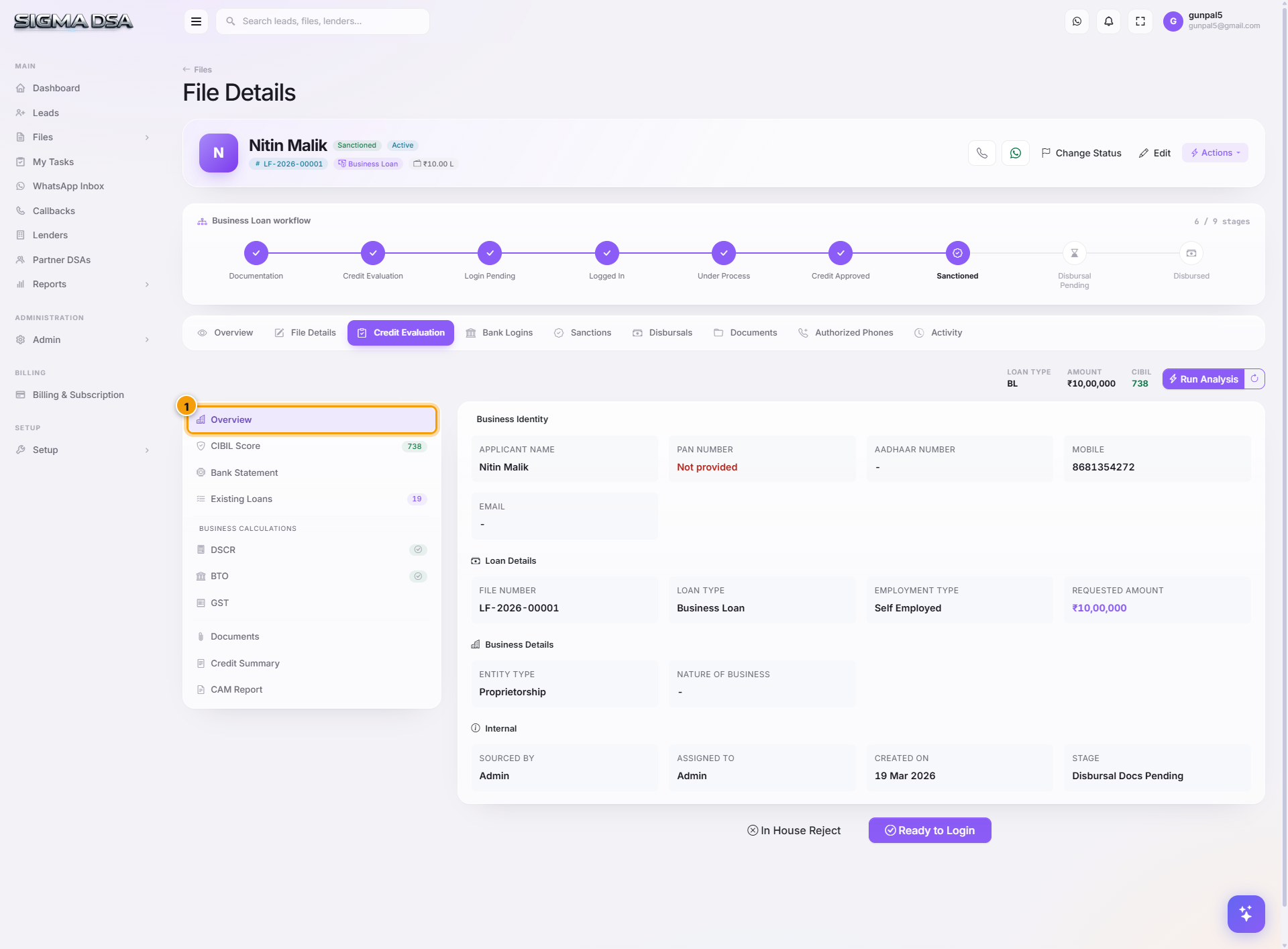
The Overview section of the Credit Evaluation editor — Business Identity, Loan Details, Business Details, and Internal flags. The applicant + file basics every underwriting decision starts from.
The Overview section is the first sidebar entry in the Credit Evaluation editor. It captures the basics that every other section refers back to — who the applicant is, what they're asking for, what kind of business they run, and any internal flags ops should know about.
What's on the section
1. Business Identity
The borrower's identifying info as it'll appear on the lender's application:
- Applicant Name — pulled from the file's applicant card.
- PAN / GST Number / Aadhaar Number — KYC IDs.
- Mobile / Email — primary contact.
Fields validate format on save. PAN, GST and Aadhaar that have been OCR-extracted on the Documents tab auto-fill here.
2. Loan Details
What the applicant is asking for:
- File Number (e.g.,
LF-2026-00001) — system-generated, not editable. - Loan Type — Home Loan, Personal, Business, LAP, etc.
- Employment Type — Salaried / Self-Employed / Business.
- Requested Amount — the ask.
Changing the loan type here re-routes the file through the loan-type-specific workflow (e.g., switching from Personal Loan to Home Loan surfaces the Property card on File Details).
3. Business Details
Shown for self-employed and business loans:
- Entity Type — Proprietorship, Partnership, LLP, Private Limited.
- Nature of Business — short text describing what the business does (used in the credit summary).
For salaried applicants this card is collapsed/hidden.
4. Internal
Operations-only context — not sent to the bank:
- Sourced By — the team member who originally brought in the lead.
- Assigned To — the file owner (operations).
- Created On — file creation date (auto).
- Stage — current funnel position (auto).
Common flows from this section
- Update PAN after KYC verification → Business Identity card → save. Other sections that rely on PAN (CIBIL pull, lender APIs) pick up the new value automatically.
- Switch from Personal to Business Loan → Loan Details card → change Loan Type → save. The sidebar reveals DSCR/BTO/GST as relevant; Existing Loans count refreshes.
- Update Nature of Business before generating the Credit Summary → Business Details → save. The summary template inlines this field.
Next steps
Credit Evaluation
Tour of the SigmaDSA Credit Evaluation editor — the ten sections (Overview, CIBIL Score, Bank Statement, Existing Loans, DSCR, BTO, GST, Documents, Credit Summary, CAM Report) that together produce the file's underwriting picture.
CIBIL Report section
The CIBIL Report section of the Credit Evaluation editor — fetching a bureau report per party, the report balance, score and scoring factors, summary, accounts with the DPD grid, and enquiries.