Notification settings
Choose who receives each kind of SigmaDSA notification — callback reminders, lead notifications and loan file notifications can go to the assigned user, an admin, or both.
Notification settings decides who gets told when something happens. The wording of each message lives in notification templates; this page is purely about recipients.
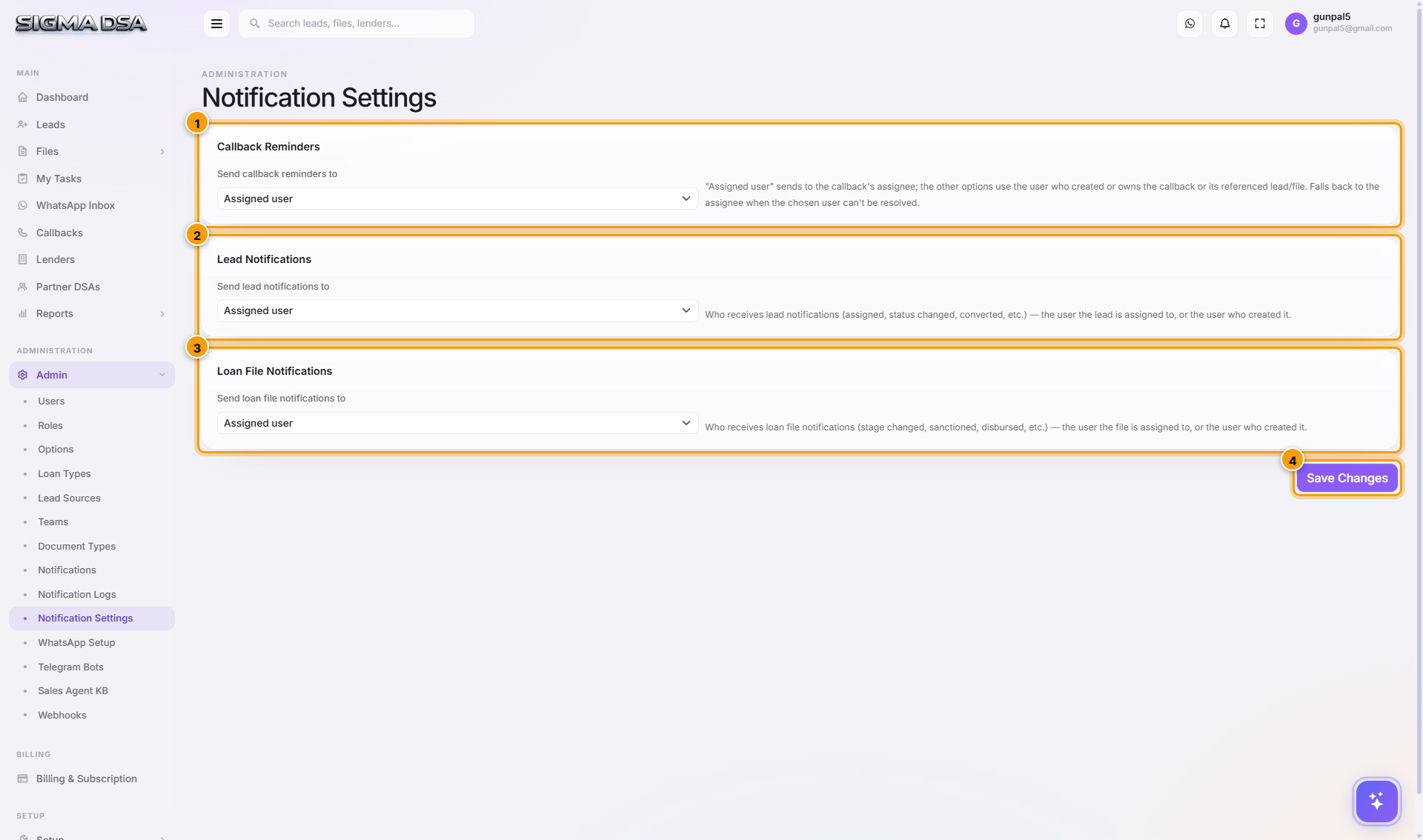
The three groups
| Group | Covers |
|---|---|
| Callback Reminders | Reminders as a scheduled callback comes due. |
| Lead Notifications | New lead, assignment, status change. |
| Loan File Notifications | File events — stage moves, bank logins, sanctions, disbursals. |
Each has one setting: send to. The default is the assigned user — the person who actually has to act. You can widen it to admins where a manager genuinely needs a copy.
Resist routing everything to admins. A manager who gets every lead notification stops reading them, and then misses the one that mattered.
Click Save Changes to apply.
Next steps
- Notification templates — what the messages say
- Notification logs — what was actually sent
- Options — reminder timing
Notifications
Manage email, WhatsApp, and SMS notification templates in SigmaDSA — define when messages fire, who receives them, what the body says, and which variables are interpolated. WhatsApp templates sync to Meta for approval.
Notification Logs
Audit trail of every notification SigmaDSA has tried to send — date, channel, recipient, trigger event, the referenced record, status (Sent / Delivered / Read / Failed), and failure reason where applicable.