Options
Tenant-wide behaviour switches in SigmaDSA — which documents get AI extraction, how leads are auto-assigned, which leads are hidden by default, and when WhatsApp reminders go out.
Options is where a tenant admin sets the behaviour everyone else works under: what the AI extracts, how leads are handed out, what the Leads list shows by default, and when reminders go out.
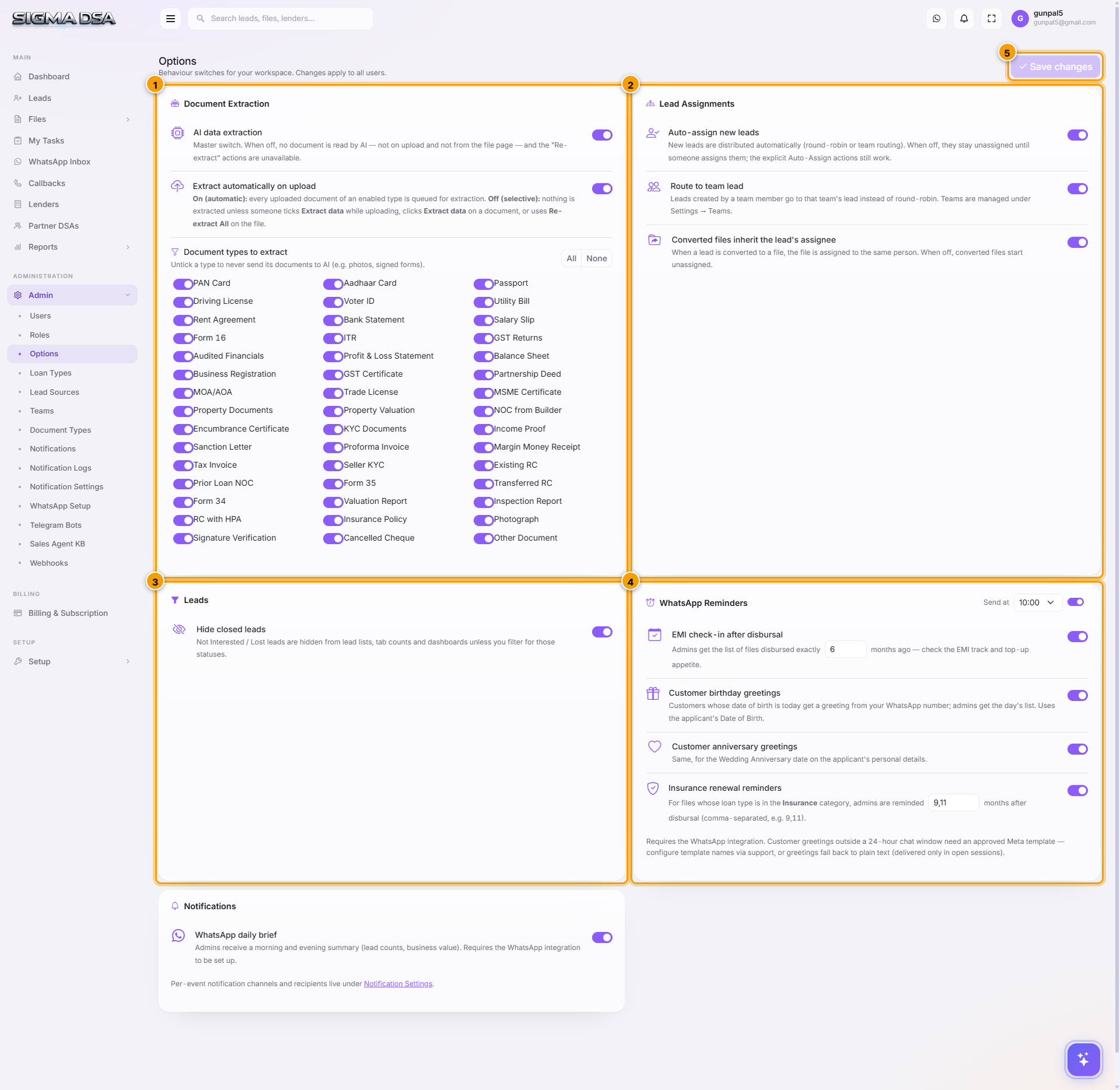
Document Extraction
A checklist of every document type with extraction on or off — PAN Card, Aadhaar, Bank Statement, Salary Slip, Form 16, ITR, GST Returns, Audited Financials, P&L, Balance Sheet, and the rest. All and None flip the whole list.
Extraction costs credits, so this is a budget decision as much as a technical one. Leave it on for the documents that feed underwriting — ITRs, bank statements, financials, KYC — and off for the ones where there's nothing structured worth pulling out.
Lead Assignments
Controls whether new leads are auto-assigned to a user as they arrive, rather than sitting unclaimed. On by default. Turn it off if you'd rather a manager distribute leads by hand.
There's a matching switch for loan files, so files created outside the lead pipeline also land with an owner.
Leads
Hides Not Interested and Lost leads from the default Leads view. They aren't deleted and they still count in reports — they just stop crowding the list your reps look at all day. Clear the filter when you need them.
WhatsApp Reminders
Sets the hour follow-up reminders go out. Pick a time your customers will actually read — and that your team is around to handle the replies to.
Notifications
Tenant-level notification behaviour. Per-event recipients live on the separate Notification Settings page.
Changes apply to the whole tenant. Click Save changes — nothing takes effect until you do.
Next steps
- Document types — the catalogue behind the extraction list
- Notification settings
- Teams — who auto-assignment can assign to
Webhooks & API keys
Push leads into SigmaDSA from your website, landing pages or ad platforms — webhook endpoints for creating leads and logging call attempts, secured with an API key.
Setup
The SigmaDSA Setup section — branding, public website, email domain, email accounts, DNS records. Configure your tenant's customer-facing presence and email infrastructure.