FilesTour of file details page
Sanctions tab
Tour of the Sanctions tab — every sanction letter received on the file with amount, lender, ROI, tenure, conditions, and acceptance status.
The Sanctions tab is where every sanction letter the file has received lives. A single file submitted to multiple lenders can have multiple sanctions; you'll accept one (or split across two) and move toward disbursal.
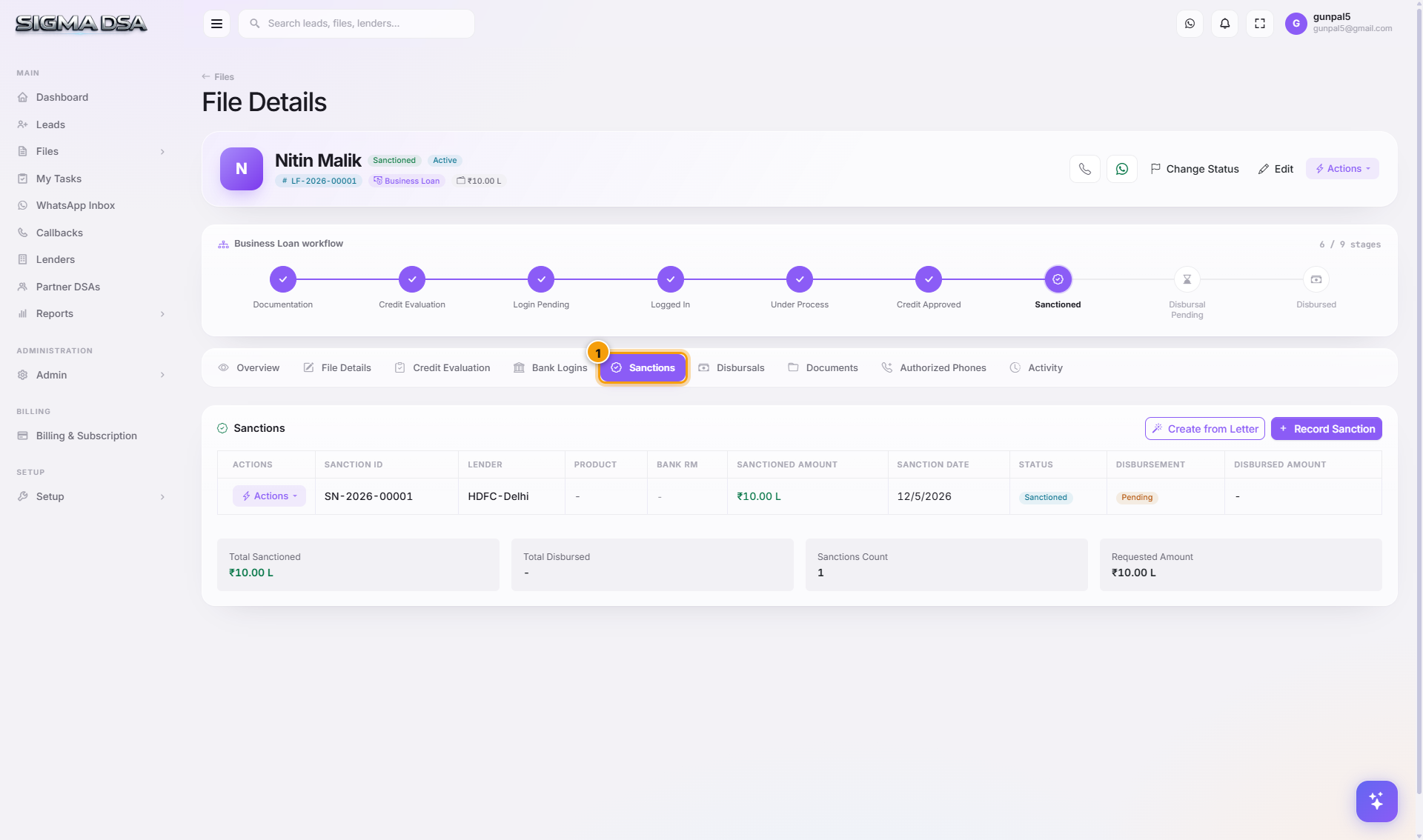
What's on the tab
- Add Sanction button at the top-right (also accessible via Actions menu) opens the Sanction modal.
- One row per sanction with: Lender, Sanctioned Amount, ROI (interest rate), Tenure (months), EMI, Processing Fee, Sanction Date, Validity (sanction letter expiry), Conditions (free-text), Acceptance status.
- Per-row actions — Edit, Mark Accepted, Mark Rejected, Generate Disbursal (when accepted).
Sanction fields explained
| Field | What it captures |
|---|---|
| Sanctioned Amount | The ₹ approved. May be less than requested (banks often haircut). |
| ROI | Annual percentage rate quoted in the sanction letter. |
| Tenure | Repayment period in months. |
| EMI | Calculated from amount + ROI + tenure (auto-computed if you don't override). |
| Processing Fee | Bank's one-time charge — sometimes ₹, sometimes %, captured as ₹. |
| Validity | Sanction letter expiry date. If you don't disburse before this, the bank re-evaluates. |
| Conditions | Pre-disbursal conditions the borrower must satisfy (e.g., "Submit registered sale deed", "Sign LOD with corporate guarantee"). |
Common flows from this tab
- Sanction came in → Actions menu on file → Sanction → fill the modal → row appears here. See Track sanctions and disbursals.
- Multiple banks sanctioned → you'll have multiple rows. Pick the best terms and Mark Accepted on that row; Mark Rejected on others.
- Sanction letter conditions met → Edit the row, tick off conditions, then click Generate Disbursal to record the disbursal event.
Next steps
Bank Logins tab
Tour of the Bank Logins tab on the file detail page — per-lender submission rows, status, RM contact, query threads, and how to add or sanction directly from this tab.
Disbursals tab
Tour of the Disbursals tab — every disbursal event on the file with date, amount, commission earned, mode, and supporting reference.