CAM Report
The Credit Appraisal Memo in SigmaDSA — financial spreads pulled from the file's own documents, policy deviations flagged, an AI-drafted narrative, and a formatted CAM PDF to send with the login.
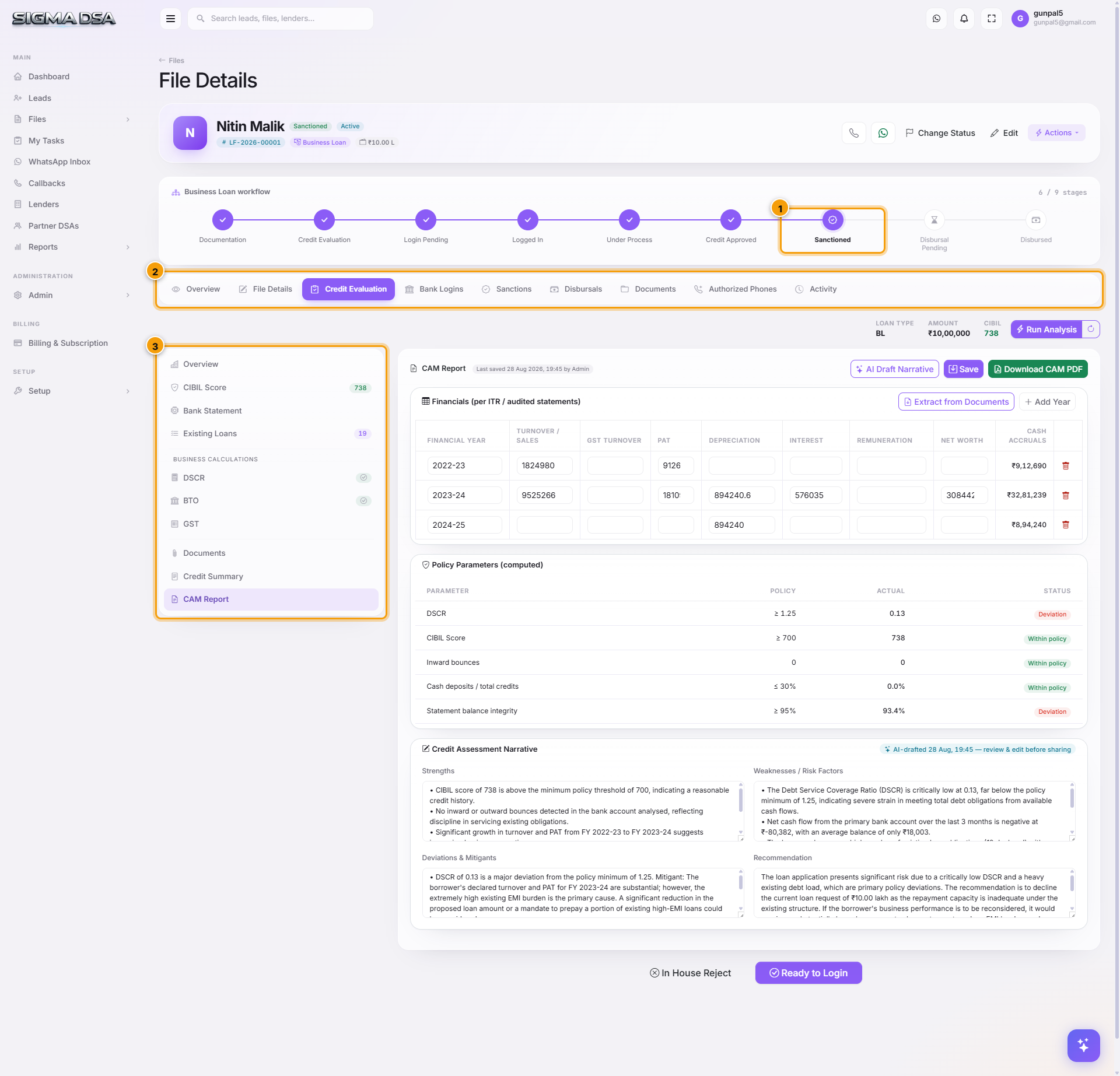
The CAM Report is the last section of the Credit Evaluation editor and the one that produces something you actually send. A Credit Appraisal Memo is the single document a bank's credit team reads before deciding — borrower, financials, ratios, and the argument for lending. SigmaDSA assembles it from work already on the file.
Building the CAM
Pull the spreads from documents
Extract from Documents reads the ITRs, P&L statements and balance sheets already uploaded to the file and fills the financial spread columns — turnover, profit, depreciation, debtors, creditors — year by year. Add Year gives you another column when you have more history than the default.
Everything it fills is editable. Where the extractor is unsure it leaves the cell for you rather than guessing.
Check the deviations
Figures that fall outside the loan type's policy are flagged as deviations — a DSCR below the floor, a turnover drop year on year, a bureau score under the threshold. These are the things the credit officer will ask about, so it is better to have an answer ready than to be surprised.
Draft the narrative
AI Draft Narrative writes the underwriting story from the numbers on the file — who the borrower is, what the financials show, why the case holds together. Read it, edit anything you disagree with, and Save.
Download the PDF
Download CAM PDF produces the formatted memo — stat cards, financial tables, ratio pills and a score bar — ready to attach to the login or email to the RM.
What feeds the CAM
The CAM is downstream of the rest of the Credit Evaluation editor, so the work is already done by the time you open it:
| Source | What it contributes |
|---|---|
| CIBIL Score | Bureau score, vintage, defaults |
| Bank Statement | Inflows, average balance, bounces, detected EMIs |
| Existing Loans | Running obligations for the debt-service line |
| DSCR / BTO / GST | The computed ratios |
| Uploaded ITRs, P&L, balance sheets | The spread columns |
Run Analysis in the file header refreshes the underlying extraction across sections. If the spreads look stale after uploading new financials, run it before extracting again.
Next steps
- Credit Evaluation editor — all ten sections
- Credit Summary — the short narrative
- Bank logins — sending the file with its CAM
Credit Summary section
The Credit Summary section of the Credit Evaluation editor — the final underwriting narrative. One paragraph that the relationship manager sends to the bank along with the application packet.
Track sanctions and disbursals
How to record sanction letters, accept the best offer, capture pre-disbursal conditions, and log disbursals (with PF, GST, commission) on a SigmaDSA loan file.